


If you work in digital marketing or manage a portfolio of niche websites, you’ve probably heard that web push notifications are a dying channel. Most industry benchmarks put the average click-through rate (CTR) for web push somewhere between 1% and 3%.
But when executed correctly, push notifications remain one of the most powerful tools for driving instant, high-intent traffic. Recently, I managed to hit a 19.5% CTR on a single campaign, and I have the data to back it up.
In this article, I’m going to break down exactly how I achieved this, the psychology behind the copy, and the infrastructure I used to send it.
(Note: The specific notification titles and website names in the screenshots below have been hidden to protect privacy, but all images and data are sourced directly from my Trust Push dashboard).
The Raw Data: Looking at the Numbers
Let’s look at the analytics for the top-performing campaign over a 30-day period.
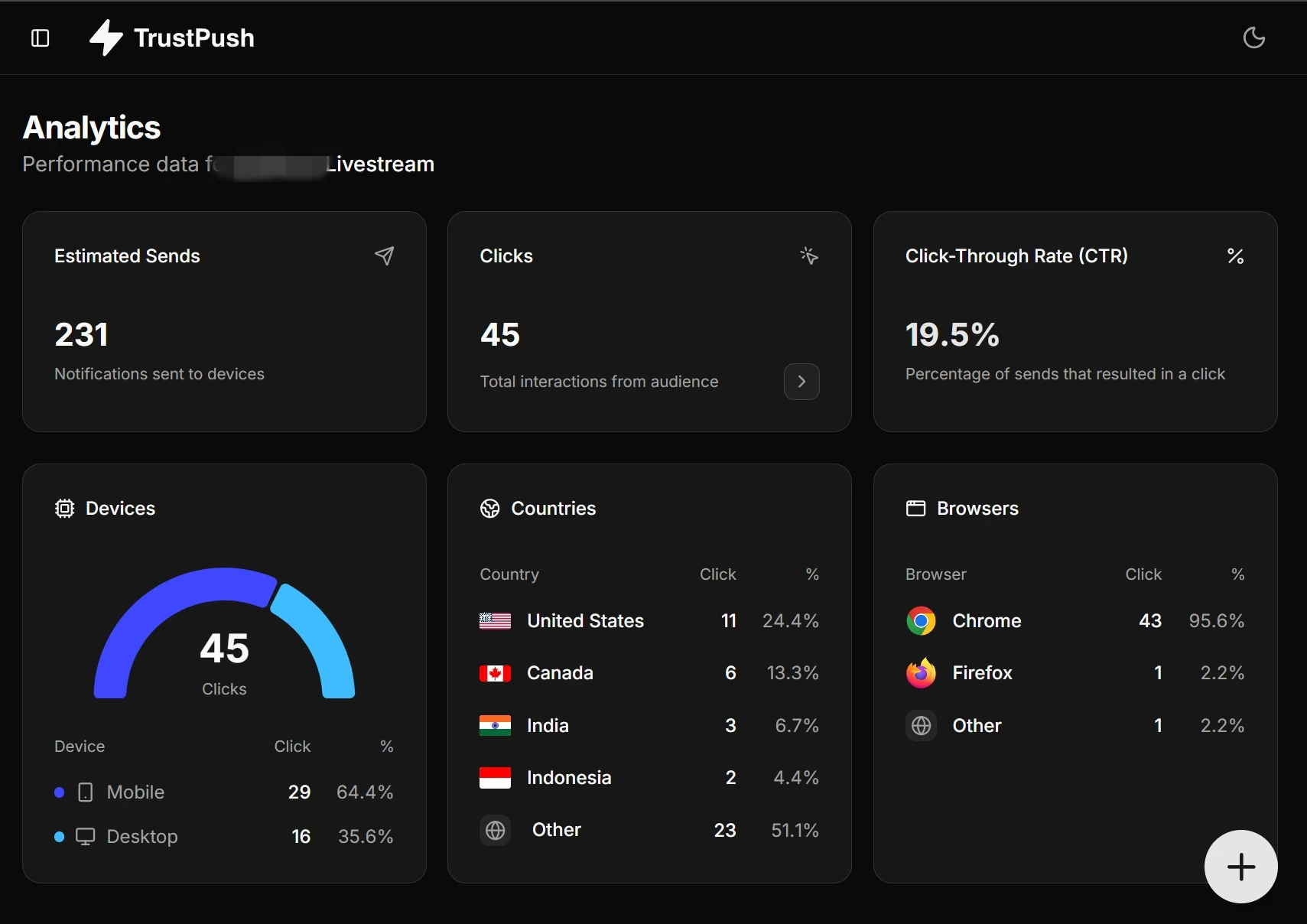
- Estimated Sends: 231
- Total Clicks: 45
- Click-Through Rate (CTR): 19.5%
Beyond the top-level metrics, diving into the demographic and device data reveals exactly where this engagement is coming from:
- Device Split: 64.4% of the clicks came from Mobile devices, while 35.6% came from Desktop.
- Top Geographies: The United States led the pack with 24.4% of the clicks, followed by Canada (13.3%) and India (6.7%).
- Browser Dominance: Chrome was the undisputed king, accounting for 95.6% of all interactions.
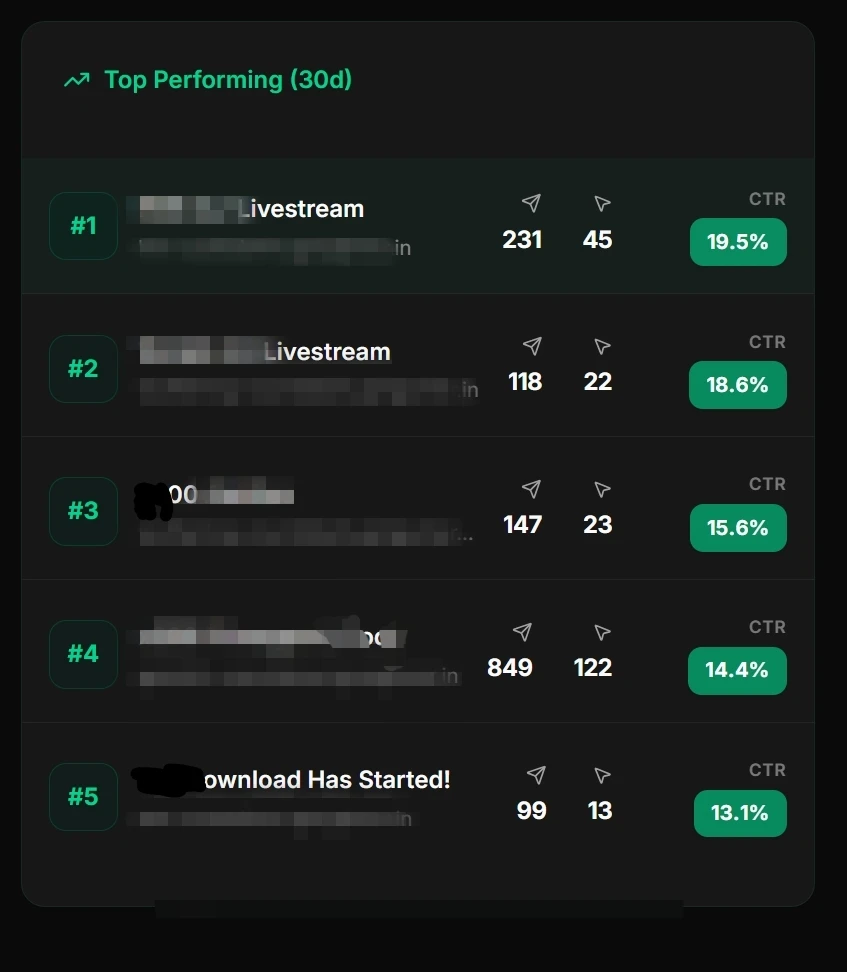
Furthermore, looking at my top 5 campaigns for the month, the success wasn’t a one-off fluke. The subsequent campaigns maintained incredibly high engagement, pulling in CTRs of 18.6%, 15.6%, 14.4%, and 13.1%.
5 Strategies That Drove a 19% CTR
Getting nearly 1 in 5 subscribers to click your notification doesn’t happen by blasting generic “New Post Published!” alerts. Here is the strategy behind the numbers.
1. Capitalize on Real-Time Urgency
If you look closely at the blurred data in the top-performing campaigns, you’ll spot the word “Livestream”.
Whether you are running a news site, a finance blog covering a live market event, or hosting a webinar, time-sensitive events are push notification gold.
Unlike emails, which sit in an inbox for hours, a push notification is immediate. By notifying users exactly when a highly anticipated stream or event was going live, I tapped into instant FOMO (Fear Of Missing Out). The user knows that if they don’t click now, they miss the action.
2. Transactional & Status Updates
The 5th top-performing campaign (13.1% CTR) features the phrase “Download Has Started!”.
This highlights another critical strategy: using push notifications for transactional, high-value status updates rather than just marketing broadcasts. When a user initiates an action (like generating a file or starting a download) and you use a push notification to confirm that their request is ready, the intent to click is massive. It transforms the notification from an “interruption” into a “service.”
3. Mobile-First Optimization
With 64.4% of clicks coming from mobile devices, your notifications must be optimized for small screens.
- Keep it Punchy: Mobile push notifications truncate text much earlier than desktop. Put the most important words (like “Live” or “Download”) at the very beginning of the title.
- Visual Clarity: Ensure your website icon and any attached rich images are crisp and easily recognizable on a mobile lock screen.
4. Use Action Buttons
Web push notifications support action buttons for different actions. You should leverage it and use high-ctr button labels to get the user attention that makes him click.
5. Use Segments/Categories
If you have a multi niche website, you need to take care of that tech audience don’t receive finance updates. You can leverage Trust Push’s built in category feature to generate up to 5 different categories. Then user will only get what they subscribed for.
Push notification CTR is generally high for micro niche or nano niche websites than multi niche websites.
The Secret Weapon: Reliable Delivery with Trust Push
You can write the best copy in the world, but if your push service struggles with latency, your CTR will tank. When dealing with real-time events, a delay of even five minutes means the user gets the notification after the moment has passed.
To ensure instant delivery and get clear, actionable analytics, I use Trust Push.
Why Trust Push Makes a Difference:
- Lightning-Fast Delivery: Built for speed, ensuring that time-sensitive alerts hit the user’s screen exactly when you trigger them.
- Clean Analytics: As you can see from the dashboard screenshots, tracking exactly what works—down to the browser, device, and country—is seamless. This allows for rapid A/B testing and optimization.
- Developer-Friendly: It’s designed to integrate smoothly into your existing tech stack without bloating your site’s code or dragging down your core web vitals.
If you are tired of shouting into the void and want to start capturing the kind of engagement your content deserves, stop relying on sluggish legacy tools.
Ready to start driving real engagement? Check out Trust Push today and transform your audience retention.